

SimulationsSimulacionesSIM-0027
Simulate, 10 minutesSimular, 10 minutos
Bits, switches and pixelsBits, interruptores y píxeles
Flip eight light switches to make any number up to two hundred fifty-five, then draw a picture in which every row is one of those numbers.Mueva ocho interruptores de luz para formar cualquier número hasta doscientos cincuenta y cinco, y luego haga un dibujo en el que cada fila es uno de esos números.
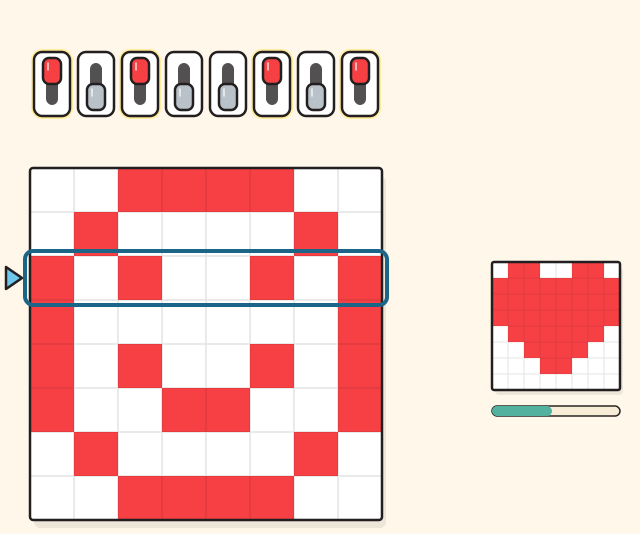
The drawing shows where it starts. It runs here once its script has loaded.El dibujo muestra dónde empieza. Funciona aquí una vez que carga su código.
Your challengeSu reto
- Make the number ten in one row.Forme el número diez en una fila. Not done yet.Todavía no.
- Make the biggest number one row can hold.Forme el número más grande que cabe en una fila. Not done yet.Todavía no.
- Copy the heart into the picture, square for square.Copie el corazón en el dibujo, cuadro por cuadro. Not done yet.Todavía no.
Every challenge done. Now try it for real at home.Todos los retos logrados. Ahora pruébelo de verdad en casa.
The row in bitsLa fila en bits
It adds up toSuma
Squares like the heartCuadros iguales al corazón
Each switch is one bit: on is one, off is zero. Each switch is worth double the one to its right. A red square is a pixel that is on. Tap a switch to flip it, or tap and drag on the picture to draw.Cada interruptor es un bit: encendido es uno, apagado es cero. Cada interruptor vale el doble del que está a su derecha. Un cuadro rojo es un píxel encendido. Toque un interruptor para cambiarlo, o toque y arrastre sobre el dibujo para dibujar.
What is happeningQué está pasando
A computer keeps everything as switches that are either on or off. One switch is a bit: on means one, off means zero. Eight bits in a row make a byte.Una computadora guarda todo como interruptores que están encendidos o apagados. Un interruptor es un bit: encendido quiere decir uno, apagado quiere decir cero. Ocho bits en fila forman un byte.
Each switch is worth double the switch to its right: one, two, four, eight, sixteen, thirty-two, sixty-four and one hundred twenty-eight. Add up the worths of the switches that are on and you have the row’s number. All eight off is zero, all eight on is two hundred fifty-five, and every number in between has exactly one pattern of switches.Cada interruptor vale el doble del que está a su derecha: uno, dos, cuatro, ocho, dieciséis, treinta y dos, sesenta y cuatro y ciento veintiocho. Sume lo que valen los interruptores encendidos y tendrá el número de la fila. Los ocho apagados son cero, los ocho encendidos son doscientos cincuenta y cinco, y cada número de en medio tiene un solo patrón de interruptores.
Adding one in bits works like adding one to nine: the switches that were on at the right turn off and the next switch turns on. That is called a carry.Sumar uno en bits funciona como sumarle uno a nueve: los interruptores encendidos de la derecha se apagan y se enciende el siguiente. A eso se le llama llevar.
A picture on a screen is a grid of tiny squares called pixels. Here each pixel is on or off, so each row of eight pixels is one byte and the whole picture is just eight numbers. That is how a computer stores, sends and changes a picture: as numbers.Una imagen en una pantalla es una cuadrícula de cuadritos llamados píxeles. Aquí cada píxel está encendido o apagado, así que cada fila de ocho píxeles es un byte y todo el dibujo es solo ocho números. Así guarda, envía y cambia una computadora una imagen: como números.
Things to tryCosas para probar
- Turn on only the switch at the far right, then only the one next to it, and keep moving left. What happens to the number each time?Encienda solo el interruptor de la derecha, luego solo el de al lado, y siga hacia la izquierda. ¿Qué le pasa al número cada vez?
- Press Add one again and again and watch the switches count. Which switch flips every single time?Presione Sumar uno una y otra vez y observe cómo cuentan los interruptores. ¿Cuál cambia todas las veces?
- Draw the first letter of your name, then read its rows out loud as numbers. Could someone redraw it from the numbers alone?Dibuje la primera letra de su nombre y luego lea sus filas en voz alta como números. ¿Podría alguien volver a dibujarla solo con los números?
This is a model of how a computer stores a picture. A real pixel is not just on or off: it mixes red, green and blue light, each with a byte of its own, and a real picture has thousands of rows. A real computer’s switches are tiny transistors on a chip, not wall switches.Este es un modelo de cómo una computadora guarda una imagen. Un píxel real no solo está encendido o apagado: mezcla luz roja, verde y azul, cada una con su propio byte, y una imagen real tiene miles de filas. Los interruptores de una computadora real son transistores diminutos en un chip, no interruptores de pared.
Use it, share it, adapt itÚsela, compártala, adáptela
The credit to copyEl crédito para copiar
Free BYRD, CC BY. “Bits, switches and pixels” from the Byrd Academy STEM Curriculum by Byrd EDU, byrdathome.org.Free BYRD, CC BY. “Bits, interruptores y píxeles”, del Currículo STEM de Byrd Academy, de Byrd EDU, byrdathome.org.
This is free to use, share and adapt, even commercially, under the Creative Commons Attribution 4.0 International license (CC BY 4.0), with this credit. What Free BYRD means.Esto es libre de usar, compartir y adaptar, incluso con fines comerciales, bajo la licencia Creative Commons Atribución 4.0 Internacional (CC BY 4.0), con este crédito. Qué significa Free BYRD.