

CurriculumCurrículoAIGrades 3 to 5Grados 3 a 5AI-ES-03
How Computers SeeCómo ven las computadoras
Can a computer see a cat? Guess hidden pictures, draw with pixels, then train and fool a picture sorter to find out how machine seeing really works.¿Puede una computadora ver un gato? Adivine imágenes ocultas, dibuje con píxeles y luego entrene y engañe a un separador de imágenes para descubrir cómo ve una máquina.
- Ways in:Formas de empezar:
- Read, 1 minuteLeer, 1 minuto
- Do, 270 minutesHacer, 270 minutos
- Simulate, 5 minutesSimular, 5 minutos
- GradesGrados
- Grades 3 to 5, and any learner ready for itGrados 3 a 5, y cualquier persona lista para ello
- TimeTiempo
- 6 sessions of about 45 minutes6 sesiones de unos 45 minutos
- CostCosto
- Needs equipmentNecesita equipo
The MESH'D components this unit uses:Los componentes MESH'D que usa esta unidad:ElectronicsElectrónicaSoftwareSoftwareHolistic DesignDiseño integral
The driving questionLa pregunta central
Can a computer see a cat?¿Puede una computadora ver un gato?
Learners discover that machine seeing is pattern matching on examples, not understanding. They find out they are better than the machine at weird cases and slower than it at fast ones.Los estudiantes descubren que el ver de una máquina es encontrar patrones en ejemplos, no entender. Descubren que son mejores que la máquina en los casos raros y más lentos que ella en los rápidos.
Learners will be able toAl terminar se podrá
- Tell the difference between senses and sensors.Distinguir entre los sentidos y los sensores.
- Explain that image recognition matches patterns from training examples.Explicar que el reconocimiento de imágenes compara patrones aprendidos de ejemplos de entrenamiento.
- Predict when a picture sorter will fail, and test the prediction.Predecir cuándo fallará un separador de imágenes y poner a prueba la predicción.
Words to knowPalabras para conocer
- sensorsensor
- cameracámara
- patternpatrón
- trainingentrenamiento
- sorter, and then its real name, classifierseparador, y luego su nombre real, clasificador
Where the math isDónde están las matemáticas
A light but real tie-in: grids and coordinates in the pixel drawing game, and the idea that a picture can be stored as numbers.Una conexión ligera pero real: cuadrículas y coordenadas en el juego de dibujo con píxeles, y la idea de que una imagen se puede guardar como números.
Big ideas in AIGrandes ideas de la IA
- Perception: Computers sense the world with sensors.Percepción: Las computadoras perciben el mundo con sensores.
Session by sessionSesión por sesión
What to doQué hacer
- Eyes versus cameras: a senses scavenger hunt. What can you sense that a phone cannot? What can a phone sense that you cannot?Ojos contra cámaras: una búsqueda de sentidos. ¿Qué puede percibir usted que un teléfono no puede? ¿Qué puede percibir un teléfono que usted no puede?
- Guess the picture: reveal a photo square by square. People often guess early from context, and the group talks about which clues they used.Adivina la imagen: se descubre una foto cuadro por cuadro. Las personas suelen adivinar pronto gracias al contexto, y el grupo conversa sobre qué pistas usó.
- Pixels and patterns: draw pictures on paper grids. A picture can be stored as numbers, and patterns in numbers are what machines find.Píxeles y patrones: se dibujan imágenes en cuadrículas de papel. Una imagen se puede guardar como números, y lo que encuentran las máquinas son patrones en esos números.
- Train a sorter: with an adult at the device, teams teach a trainable classifier tool two categories using objects or drawings, then test it.Entrenar un separador: con un adulto junto al aparato, los equipos enseñan dos categorías a una herramienta de clasificación entrenable usando objetos o dibujos, y luego la ponen a prueba.
- Fool the sorter: dress up the objects, hide part of them, or add decoys. Teams log what fooled it and make a guess about why.Engañar al separador: se disfrazan los objetos, se tapa una parte o se agregan señuelos. Los equipos anotan qué lo engañó y proponen una explicación.
- Make findings boards and get ready to run a fool-the-sorter challenge for visitors.Se hacen tableros de hallazgos y se preparan para dirigir un reto de engañar al separador con los visitantes.
What you needLo que necesita
- printed photo setsjuegos de fotos impresas
- paper gridscuadrículas de papel
- drawing suppliesmateriales de dibujo
- small everyday objects to train and test the sorterobjetos pequeños de uso diario para entrenar y probar el separador
EquipmentEquipo
- a trainable classifier tool, used with an adult at the deviceuna herramienta de clasificación entrenable, usada con un adulto junto al aparato
- a laptop or tablet with a camerauna computadora portátil o tableta con cámara
Needs equipment.Necesita equipo.
With no device at allSin ningún aparato
Play the human sorter game: one blindfolded learner is the classifier, the others train it by describing features of objects, then try to fool it the same ways. The pixel grid drawing game also runs on paper. The big idea survives intact.Jueguen al separador humano: un estudiante con los ojos vendados es el clasificador, los demás lo entrenan describiendo características de los objetos y luego intentan engañarlo de las mismas maneras. El juego de dibujo con cuadrículas de píxeles también funciona en papel. La idea central se mantiene intacta.
An adult stays at the device for all tool use, and learners never hold their own accounts or use AI alone. Use only a trainable classifier tool that an adult has checked is meant for use with children under thirteen. Train it only on objects and drawings, never on classmates' faces or anyone's face, and store no pictures of faces. AI is never for secrets, personal questions or feelings: that is a person question, so take it to a grown-up. Close every session that used the tool by having a learner say one anchor truth: a person made this tool, it learned from examples, and it can be wrong.Un adulto permanece junto al aparato durante todo el uso de la herramienta, y los estudiantes nunca tienen cuentas propias ni usan la IA a solas. Use solo una herramienta de clasificación entrenable que un adulto haya comprobado que es apta para niños menores de trece años. Entrénela solo con objetos y dibujos, nunca con la cara de los compañeros ni de nadie, y no guarde fotos de caras. La IA nunca es para secretos, preguntas personales ni sentimientos: esa es una pregunta para una persona, así que llévela a un adulto de confianza. Cierre cada sesión en que se usó la herramienta pidiendo a un estudiante que diga una de las verdades clave: una persona hizo esta herramienta, aprendió de ejemplos y puede equivocarse.
What learners make and showLo que se hace y se muestra
A fool-the-sorter challenge that visitors and family members play. A strong team explains training in one sentence, keeps a failure log with a guess about why, and runs its station safely without an adult having to step in.Un reto de engañar al separador que juegan los visitantes y la familia. Un buen equipo explica el entrenamiento en una oración, lleva un registro de fallas con una explicación de por qué y dirige su estación de forma segura sin que un adulto tenga que intervenir.
Mix-ups to expectConfusiones que esperar
- The computer sees like I do. What shows otherwise: the guess-the-picture game shows that people use meaning, while machines use patterns.La computadora ve como yo. Lo que muestra lo contrario: el juego de adivinar la imagen muestra que las personas usan el significado y las máquinas usan patrones.
- More technology means it understands more. What shows otherwise: on weird cases, the sorter loses to a kindergartner.Más tecnología significa que entiende más. Lo que muestra lo contrario: en los casos raros, el separador pierde contra un niño de kínder.
At homeEn casa
Try it at the kitchen tablePruébelo en la mesa de la cocina
Play the hiding game at home: cover a picture with paper squares, lift one square at a time, and see how soon each person can guess. Talk about the clues you used.Jueguen en casa a la imagen escondida: cubran una imagen con cuadros de papel, levanten un cuadro a la vez y vean qué tan pronto adivina cada persona. Conversen sobre las pistas que usaron.
Simulate, 5 minutesSimular, 5 minutos
Mixing light and mixing paintMezclar luz y mezclar pintura
Shine red, green and blue flashlights on a wall and watch light add up, then mix cyan, magenta and yellow paint and watch it take light away. Then match a target color both ways.Ilumine una pared con linternas roja, verde y azul y vea cómo la luz se suma; luego mezcle pintura cian, magenta y amarilla y vea cómo quita luz. Después iguale un color meta de las dos maneras.
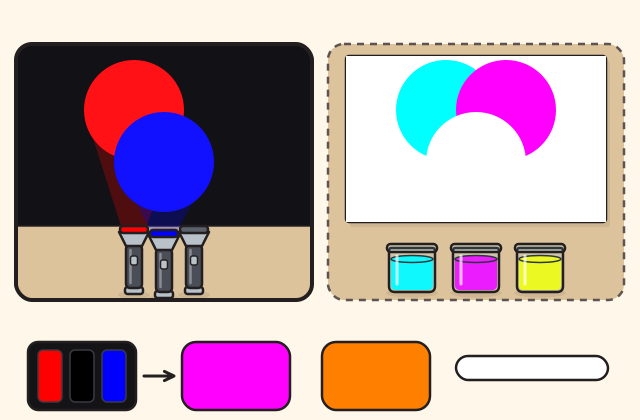
The drawing shows where it starts. It runs here once its script has loaded.El dibujo muestra dónde empieza. Funciona aquí una vez que carga su código.
Your challengeSu reto
- Mix red and green light to make yellow.Mezcle luz roja y verde para hacer amarillo. Not done yet.Todavía no.
- Turn all three lights up to make white.Suba las tres luces para hacer blanco. Not done yet.Todavía no.
- Mix cyan and yellow paint to make green.Mezcle pintura cian y amarilla para hacer verde. Not done yet.Todavía no.
- Match the target color, with light or with paint.Iguale el color meta, con luz o con pintura. Not done yet.Todavía no.
Every challenge done. Now try it for real at home.Todos los retos logrados. Ahora pruébelo de verdad en casa.
How close your mix is to the targetQué tan cerca está su mezcla de la meta
Your mix isSu mezcla es ; the target isla meta es
As a screen stores it:Como la guarda una pantalla:
A screen pixel is three tiny lights, red, green and blue, each stored as a number from none to full strength. The paints are cyan, magenta and yellow: each one soaks up one color of light.Un píxel de pantalla son tres lucecitas, roja, verde y azul, cada una guardada como un número, desde nada hasta toda su fuerza. Las pinturas son cian, magenta y amarilla: cada una absorbe un color de luz.
What is happeningQué está pasando
Light mixes by adding. Shine a red and a green flashlight on the same spot of a white wall and the spot looks yellow; add blue and it looks white. Your eye has three kinds of color sensors, tuned to red, green and blue light, and your brain reads the mix of their signals as one color.La luz se mezcla sumando. Si ilumina el mismo punto de una pared blanca con una linterna roja y una verde, el punto se ve amarillo; si agrega azul, se ve blanco. Su ojo tiene tres tipos de sensores de color, para la luz roja, la verde y la azul, y su cerebro lee la mezcla de sus señales como un solo color.
A screen uses the same trick. Every pixel is three tiny lights, red, green and blue, too small to see apart. A picture is stored as three numbers for every pixel, how bright each light should be, from zero to two hundred fifty-five.Una pantalla usa el mismo truco. Cada píxel son tres lucecitas, roja, verde y azul, demasiado pequeñas para verlas por separado. Una imagen se guarda como tres números para cada píxel, qué tan brillante debe estar cada luz, de cero a doscientos cincuenta y cinco.
Paint works the other way, by taking away. White paper bounces back every color of the light that falls on it. Cyan paint soaks up red light, magenta soaks up green, and yellow soaks up blue. Mix cyan and yellow and only green is left to bounce back, so you see green; mix all three and almost nothing bounces back, so it looks black.La pintura funciona al revés, quitando. El papel blanco devuelve todos los colores de la luz que le cae. La pintura cian absorbe la luz roja, la magenta absorbe la verde y la amarilla absorbe la azul. Si mezcla cian y amarilla, solo queda el verde para devolverse, así que ve verde; si mezcla las tres, casi nada se devuelve, así que se ve negro.
That is why a printer uses cyan, magenta and yellow ink, and a screen uses red, green and blue light.Por eso una impresora usa tinta cian, magenta y amarilla, y una pantalla usa luz roja, verde y azul.
Things to tryCosas para probar
- Turn on only red and green light, then add a little blue. What happens to the yellow?Encienda solo la luz roja y la verde, y luego agregue un poco de azul. ¿Qué le pasa al amarillo?
- Mix cyan and yellow paint. Which color of light is left to bounce back?Mezcle pintura cian y amarilla. ¿Qué color de luz queda para devolverse?
- Make the target with light, then make it again with paint, and compare the amounts.Haga la meta con luz, luego hágala otra vez con pintura, y compare las cantidades.
- Turn all three lights down to half. What happens to white?Baje las tres luces a la mitad. ¿Qué le pasa al blanco?
This is a model. Its lights are the pure red, green and blue a screen uses, and its paints are perfect inks that each soak up exactly one color of light. Real flashlights and paints are less pure: three real paints mixed together make a dark, muddy brown rather than black, which is why printers add black ink.Esto es un modelo. Sus luces son el rojo, el verde y el azul puros que usa una pantalla, y sus pinturas son tintas perfectas que absorben cada una exactamente un color de luz. Las linternas y las pinturas reales son menos puras: tres pinturas reales mezcladas dan un café oscuro y turbio en lugar de negro, y por eso las impresoras agregan tinta negra.
Open the simulation on its own pageAbrir la simulación en su propia páginaBits, switches and pixelsBits, interruptores y píxeles
Use it, share it, adapt itÚsela, compártala, adáptela
The credit to copyEl crédito para copiar
Free BYRD, CC BY. “How Computers See” from the Byrd Academy STEM Curriculum by Byrd EDU, byrdathome.org.Free BYRD, CC BY. “Cómo ven las computadoras”, del Currículo STEM de Byrd Academy, de Byrd EDU, byrdathome.org.
This is free to use, share and adapt, even commercially, under the Creative Commons Attribution 4.0 International license (CC BY 4.0), with this credit. What Free BYRD means.Esto es libre de usar, compartir y adaptar, incluso con fines comerciales, bajo la licencia Creative Commons Atribución 4.0 Internacional (CC BY 4.0), con este crédito. Qué significa Free BYRD.
Keep goingSiga adelante
What to do nextQué hacer después
Make it harderHágalo más difícil
Before testing, write down which objects you predict will fool the sorter and why. Then test each prediction and log what really happened.Antes de probar, escriba qué objetos cree que engañarán al separador y por qué. Luego ponga a prueba cada predicción y anote lo que pasó en realidad.
For a younger onePara alguien más pequeño
Play the hiding game with one picture: uncover it a square at a time and guess what it is. Then talk about the clues your eyes used.Juegue a la imagen escondida con una sola imagen: descúbrala cuadro por cuadro y adivine qué es. Luego conversen sobre las pistas que usaron sus ojos.
Try this nextPruebe esto después
Guess the hidden picture, then draw with pixelsAdivine la imagen escondida y luego dibuje con píxeles
Cover a picture with paper squares and lift one at a time to see who guesses first, draw on a grid to see how a picture becomes numbers, then play human sorter and try to fool it.Cubra una imagen con cuadros de papel y levante uno a la vez para ver quién adivina primero, dibuje en una cuadrícula para ver cómo una imagen se vuelve números, y luego jueguen al clasificador humano y traten de engañarlo.
- Ways in:Formas de empezar:
- ReadLeer
- DoHacer
- SimulateSimular
Best for ages 6 to 12Ideal de 6 a 12 años
SoftwareSoftware
Free BYRD, CC BYHome activityActividad en casa
Mixing light and mixing paintMezclar luz y mezclar pintura
Shine red, green and blue flashlights on a wall and watch light add up, then mix cyan, magenta and yellow paint and watch it take light away. Then match a target color both ways.Ilumine una pared con linternas roja, verde y azul y vea cómo la luz se suma; luego mezcle pintura cian, magenta y amarilla y vea cómo quita luz. Después iguale un color meta de las dos maneras.
- Ways in:Formas de empezar:
- SimulateSimular
Best for ages 6 and upIdeal desde los 6 años
ElectronicsElectrónicaDesignDiseño
Free BYRD, CC BYSimulationSimulación
 SIM-0027
 Bits, switches and pixelsBits, interruptores y píxeles
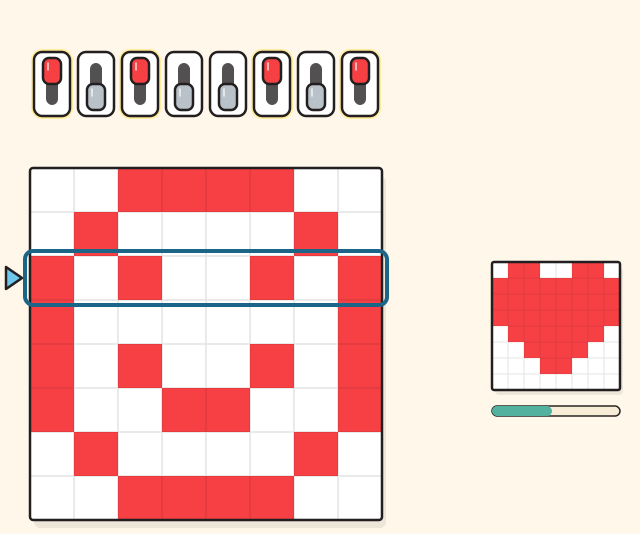
Flip eight light switches to make any number up to two hundred fifty-five, then draw a picture in which every row is one of those numbers.Mueva ocho interruptores de luz para formar cualquier número hasta doscientos cincuenta y cinco, y luego haga un dibujo en el que cada fila es uno de esos números.
- Ways in:Formas de empezar:
- SimulateSimular
Best for ages 6 and upIdeal desde los 6 años
ElectronicsElectrónicaSoftwareSoftware
Free BYRD, CC BYSimulationSimulación
Inside a phone, from the glass to the speakerDentro de un teléfono, del vidrio al altavoz
Go through the glass of a phone and keep going: the touch grid, the pixels, the battery, the main board, the camera, the motion sensors, the signals from space and the speaker.Atraviese el vidrio de un teléfono y siga adelante: la cuadrícula táctil, los píxeles, la batería, la placa principal, la cámara, los sensores de movimiento, las señales del espacio y el altavoz.
- Ways in:Formas de empezar:
- TourRecorrer
Best for ages 5 and upIdeal desde los 5 años
ElectronicsElectrónicaSoftwareSoftware
Free BYRD, CC BYVirtual tourRecorrido virtual