
Virtual toursRecorridos virtualesTOUR-0002

TOUR-0002

Virtual tour, 8 minutes, 8 stopsRecorrido virtual, 8 minutos, 8 paradas

Inside a phone, from the glass to the speakerDentro de un teléfono, del vidrio al altavoz

Go through the glass of a phone and keep going: the touch grid, the pixels, the battery, the main board, the camera, the motion sensors, the signals from space and the speaker.Atraviese el vidrio de un teléfono y siga adelante: la cuadrícula táctil, los píxeles, la batería, la placa principal, la cámara, los sensores de movimiento, las señales del espacio y el altavoz.

AgesEdades
Every age. Best for ages 5 and up.Todas las edades. Ideal desde los 5 años.
TopicTema
Computers, robots and AIComputadoras, robots e IA
HowCómo
Tap the ring, or use Go deeper or the arrow keys.Toque el anillo, o use Más adentro o las flechas del teclado.

The MESH'D components this tour shows:Los componentes MESH'D que muestra:ElectronicsElectrónicaSoftwareSoftware

The stopsLas paradas

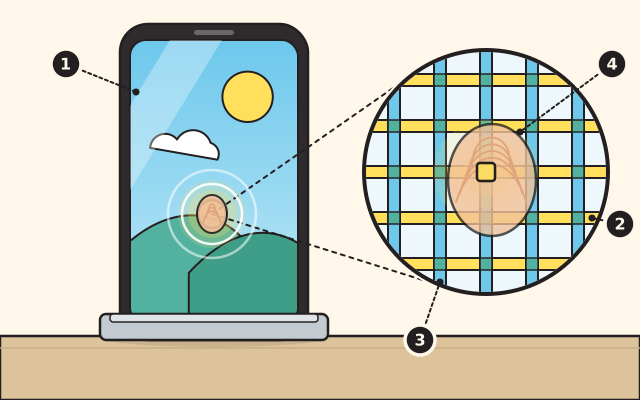
Look forBusque

  1. The glassEl vidrio
  2. A row lineUna línea de fila
  3. A column lineUna línea de columna
  4. The fingertip over a crossingLa yema del dedo sobre un cruce

Stop 1Parada 1

The glass and the touchscreenEl vidrio y la pantalla táctil

The front of a phone is a sheet of glass. Under it lies a grid of thin conducting lines, rows one way and columns the other. Each crossing is a capacitor: two conductors that can hold a little electric charge.El frente de un teléfono es una lámina de vidrio. Debajo hay una cuadrícula de líneas conductoras muy finas, unas en filas y otras en columnas. Cada cruce es un capacitor: dos conductores que pueden guardar un poco de carga eléctrica.

Your skin is mostly water, so it conducts too. A fingertip on the glass changes how much charge the crossing under it can hold. The phone measures the crossings and finds where you touched. Each crossing works on its own, so two fingers can pinch to zoom.Su piel es casi toda agua, así que también conduce. La yema de un dedo sobre el vidrio cambia cuánta carga puede guardar el cruce que está debajo. El teléfono mide los cruces y encuentra dónde tocó usted. Cada cruce funciona por su cuenta, por eso dos dedos pueden pellizcar para acercar la imagen.
Learn more: University of California, Berkeley, Designing Information Devices and Systems, lecture note on the capacitive touchscreenMás información: University of California, Berkeley, Designing Information Devices and Systems, lecture note on the capacitive touchscreen

Next: The pixelsSiguiente: Los píxeles

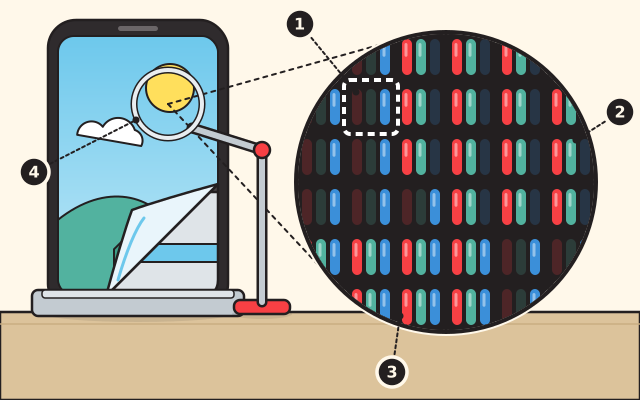
Look forBusque

  1. One pixelUn píxel
  2. Its red, green and blue partsSus partes roja, verde y azul
  3. White, where all three shineBlanco, donde brillan los tres
  4. The magnifierLa lupa

Stop 2Parada 2

The pixelsLos píxeles

Beneath the glass is the display. Its picture is made of tiny dots called pixels, and each pixel has red, green and blue parts that light up.Debajo del vidrio está la pantalla. Su imagen está hecha de puntitos llamados píxeles, y cada píxel tiene partes rojas, verdes y azules que se encienden.

Red, green and blue are the primary colors of light, and all three shining together make white. By mixing them, a screen makes the whole range of colors in a photo or a movie. Look at a screen through a magnifier and you may see the tiny red, green and blue dots.El rojo, el verde y el azul son los colores primarios de la luz, y los tres juntos forman el blanco. Mezclándolos, una pantalla forma toda la gama de colores de una foto o una película. Mire una pantalla con una lupa y quizá vea los puntitos rojos, verdes y azules.

Try this at homePruébelo en casaMixing light and mixing paintMezclar luz y mezclar pintura

Learn more: University of Arizona, Optical Sciences outreach, Color MixingMás información: University of Arizona, Optical Sciences outreach, Color Mixing

Next: The batterySiguiente: La batería

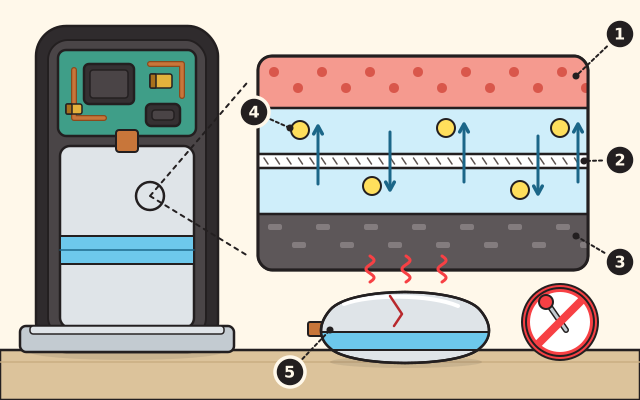
Look forBusque

  1. The positive sideEl lado positivo
  2. The separatorEl separador
  3. The negative sideEl lado negativo
  4. Lithium ionsLos iones de litio
  5. A swollen battery: never poke itUna batería hinchada: nunca la perfore

Stop 3Parada 3

The batteryLa batería

A phone runs on a rechargeable lithium ion battery. Inside, a thin separator keeps a positive side and a negative side apart, and lithium ions travel between them through a liquid, the electrolyte. That is how it stores energy and gives it back.Un teléfono funciona con una batería recargable de iones de litio. Por dentro, un separador delgado mantiene aparte un lado positivo y uno negativo, y los iones de litio viajan entre ellos a través de un líquido, el electrolito. Así guarda energía y la devuelve.

Dropping, crushing or puncturing can damage a battery, and a damaged one can catch fire or explode. Gas building up inside can make it swell. If a phone bulges, hisses, leaks, smokes or gets hot, stop using it and hand it to a grown-up. Never poke it.Una caída, un golpe que la aplaste o una perforación pueden dañar una batería, y una batería dañada puede incendiarse o explotar. El gas que se acumula adentro puede hincharla. Si un teléfono se abulta, sisea, gotea, echa humo o se calienta, deje de usarlo y déselo a una persona adulta. Nunca lo perfore.

Try this at homePruébelo en casaLight up a paper circuit cardIlumine una tarjeta con un circuito de papel

Learn more: Occupational Safety and Health Administration, Preventing Fire and/or Explosion Injury from Small and Wearable Lithium Battery Powered DevicesMás información: Occupational Safety and Health Administration, Preventing Fire and/or Explosion Injury from Small and Wearable Lithium Battery Powered Devices

Next: The main boardSiguiente: La placa principal

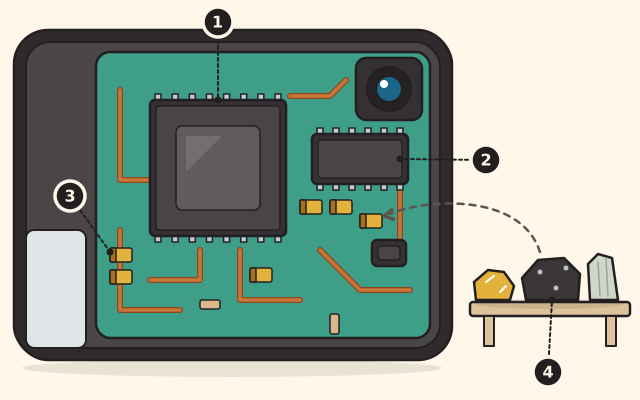
Look forBusque

  1. The processorEl procesador
  2. The memoryLa memoria
  3. A tantalum capacitorUn capacitor de tántalo
  4. Minerals from the EarthMinerales de la Tierra

Stop 4Parada 4

The main boardLa placa principal

Beside the battery sits the main board, crowded with chips and tiny parts. Two of its chips are the processor and the memory.Junto a la batería está la placa principal, llena de chips y piezas diminutas. Dos de sus chips son el procesador y la memoria.

All of it comes from rocks and minerals mined from the Earth. A phone holds about sixty five different chemical elements, more than half of the whole periodic table. The metal tantalum goes into tiny capacitors that store electric charge and keep the voltage steady.Todo esto viene de rocas y minerales sacados de la Tierra. Un teléfono contiene unos sesenta y cinco elementos químicos distintos, más de la mitad de toda la tabla periódica. El metal tántalo va en capacitores diminutos que guardan carga eléctrica y mantienen estable el voltaje.

Try this at homePruébelo en casaWire a circuitConecte un circuito

Learn more: Smithsonian National Museum of Natural History, New Museum Display Showcases the Mineral Building Blocks of CellphonesMás información: Smithsonian National Museum of Natural History, New Museum Display Showcases the Mineral Building Blocks of Cellphones

Next: The cameraSiguiente: La cámara

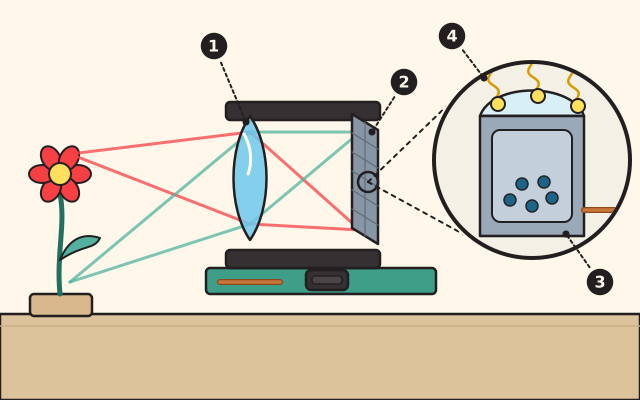
Look forBusque

  1. The lensLa lente
  2. The image sensorEl sensor de imagen
  3. One pixelUn píxel
  4. Light comes in, electrons collectEntra la luz, se juntan electrones

Stop 5Parada 5

The cameraLa cámara

Behind the tiny lens sits an image sensor, a grid of light detectors called pixels, a word short for picture element. Each pixel collects particles of light, called photons, and turns them into electrons, a little electrical signal. A processor puts all the signals together into a picture.Detrás de la lente diminuta hay un sensor de imagen, una cuadrícula de detectores de luz llamados píxeles, palabra que viene de elemento de imagen. Cada píxel recoge partículas de luz, llamadas fotones, y las convierte en electrones, una pequeña señal eléctrica. Un procesador junta todas las señales y forma una foto.

A team at NASA's Jet Propulsion Laboratory developed this kind of sensor in the nineteen nineties to make cameras for spacecraft smaller. Today it is in camera phones.Un equipo del Laboratorio de Propulsión a Chorro de la NASA desarrolló este tipo de sensor en los años noventa para hacer más pequeñas las cámaras de las naves espaciales. Hoy está en los teléfonos con cámara.

Try this at homePruébelo en casaBits, switches and pixelsBits, interruptores y píxeles

Learn more: NASA Spinoff, Image Sensors Enhance Camera TechnologiesMás información: NASA Spinoff, Image Sensors Enhance Camera Technologies

Next: The motion sensorsSiguiente: Los sensores de movimiento

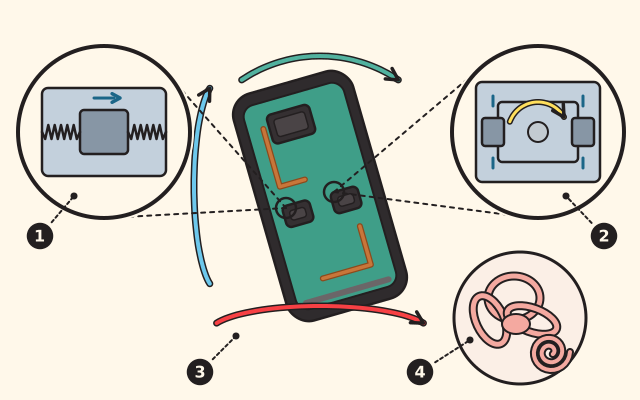
Look forBusque

  1. The accelerometerEl acelerómetro
  2. The gyroscopeEl giroscopio
  3. Turning around three directionsGirar alrededor de tres ejes
  4. The balance sense in your inner earEl sentido del equilibrio en su oído interno

Stop 6Parada 6

The motion sensorsLos sensores de movimiento

Two tiny sensors in a phone feel its motion. The accelerometer senses acceleration: any change in how fast the phone moves, or in which direction. The gyroscope senses turning: how fast the phone spins around each of three directions.Dos sensores diminutos de un teléfono sienten su movimiento. El acelerómetro siente la aceleración: cualquier cambio en qué tan rápido se mueve el teléfono o en qué dirección. El giroscopio siente los giros: qué tan rápido gira el teléfono alrededor de cada uno de tres ejes.

Together they work much like the balance sense in your inner ear, which helps you feel motion and the position of your body. A phone's gyroscope can even record the twists of a person doing jumping jacks.Juntos funcionan de manera muy parecida al sentido del equilibrio de su oído interno, que le ayuda a sentir el movimiento y la posición de su cuerpo. El giroscopio de un teléfono puede registrar incluso los giros de una persona que hace saltos de tijera.

Try this at homePruébelo en casaClock a walk and find your speed on a graphCronometre una caminata y encuentre su velocidad en una gráfica

Learn more: Lawrence Livermore National Laboratory, Examining Rotational MotionMás información: Lawrence Livermore National Laboratory, Examining Rotational Motion

Next: Signals from spaceSiguiente: Señales del espacio

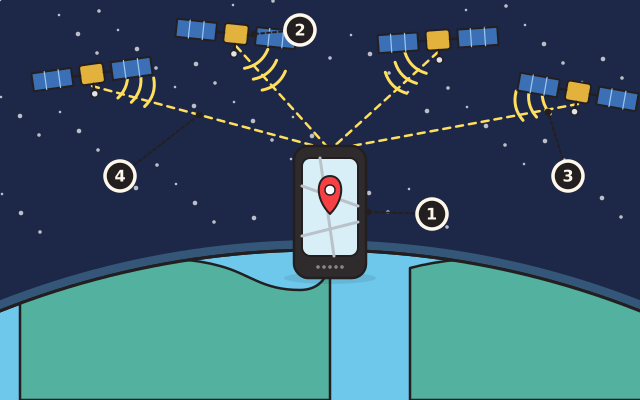
Look forBusque

  1. The GPS receiver in the phoneEl receptor GPS del teléfono
  2. A navigation satelliteUn satélite de navegación
  3. Its signalSu señal
  4. Distances to four satellitesLas distancias a cuatro satélites

Stop 7Parada 7

Signals from spaceSeñales del espacio

More than thirty navigation satellites circle high above Earth. We know where each one is, and each one keeps sending out signals. A GPS receiver inside your phone is always listening for them.Más de treinta satélites de navegación giran muy por encima de la Tierra. Sabemos dónde está cada uno, y cada uno envía señales todo el tiempo. Un receptor GPS dentro de su teléfono siempre las está escuchando.

From the signals, the receiver works out how far away each satellite is. Once it knows its distance from four or more of them, it can figure out where you are, usually to within a few yards.Con las señales, el receptor calcula qué tan lejos está cada satélite. Cuando conoce su distancia a cuatro o más, puede saber dónde está usted, por lo general con unos pocos metros de diferencia.

Try this at homePruébelo en casaNewton's cannonballLa bala de cañón de Newton

Learn more: NASA Space Place, How Does GPS Work?Más información: NASA Space Place, How Does GPS Work?

Next: The speaker and the microphoneSiguiente: El altavoz y el micrófono

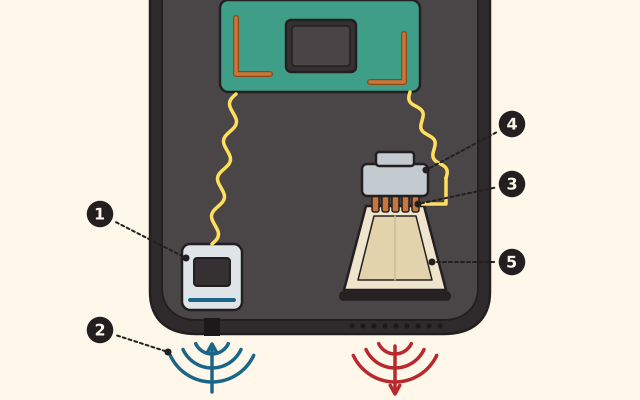
The bottom of a phone cut open. At left, the sound of a voice comes up into the microphone's hole, and a yellow signal runs to the main board. At right, the speaker's magnet, copper coil and cone send sound waves out of the grille.

Look forBusque

  1. The microphoneEl micrófono
  2. The sound of your voiceEl sonido de su voz
  3. The coilLa bobina
  4. The magnetEl imán
  5. The cone, pushing the airEl cono, que empuja el aire

Stop 8Parada 8

The speaker and the microphoneEl altavoz y el micrófono

The speaker turns an electrical signal into sound. The signal runs through a coil of wire that sits in the field of a ring shaped magnet, and the current pushes the coil in and out.El altavoz convierte una señal eléctrica en sonido. La señal pasa por una bobina de alambre que está en el campo de un imán en forma de anillo, y la corriente empuja la bobina hacia adentro y hacia afuera.

The coil is glued to a cone. As the coil moves, the cone moves the air in front of it, and you hear that pattern of squeezed and stretched air as sound. Beside it, the microphone listens for your voice.La bobina está pegada a un cono. Cuando la bobina se mueve, el cono mueve el aire que tiene delante, y ese patrón de aire apretado y estirado lo oímos como sonido. A su lado, el micrófono escucha su voz.

Try this at homePruébelo en casaBuild a cup phoneConstruya un teléfono de vasos

Learn more: University of California, Santa Barbara, Physics Lecture Demonstrations, LoudspeakerMás información: University of California, Santa Barbara, Physics Lecture Demonstrations, Loudspeaker

Use it, share it, adapt itÚsela, compártala, adáptela

The credit to copyEl crédito para copiar

Free BYRD, CC BY. “Inside a phone, from the glass to the speaker” from the Byrd Academy STEM Curriculum by Byrd EDU, byrdathome.org.Free BYRD, CC BY. “Dentro de un teléfono, del vidrio al altavoz”, del Currículo STEM de Byrd Academy, de Byrd EDU, byrdathome.org.

This is free to use, share and adapt, even commercially, under the Creative Commons Attribution 4.0 International license (CC BY 4.0), with this credit. What Free BYRD means.Esto es libre de usar, compartir y adaptar, incluso con fines comerciales, bajo la licencia Creative Commons Atribución 4.0 Internacional (CC BY 4.0), con este crédito. Qué significa Free BYRD.

Keep goingSiga adelante

What to do nextQué hacer después

Make it harderHágalo más difícil

Make a chart of the phone's sensors from this tour: the touch grid, the camera, the motion sensors, the GPS receiver and the microphone. For each one, write what it senses from the world and what it turns that into.Haga una tabla con los sensores del teléfono de este recorrido: la cuadrícula táctil, la cámara, los sensores de movimiento, el receptor GPS y el micrófono. Para cada uno, escriba qué percibe del mundo y en qué lo convierte.

For a younger onePara alguien más pequeño

With a grown-up, find the parts on a real phone: the glass you touch, the camera lens, the holes for the speaker and the microphone. Then look at a white part of the screen through a magnifier and name the three colors you see.Con una persona adulta, busque las partes en un teléfono de verdad: el vidrio que se toca, la lente de la cámara, los agujeros del altavoz y del micrófono. Luego mire una parte blanca de la pantalla con una lupa y nombre los tres colores que ve.

Try this nextPruebe esto después

SIM-0018

Mixing light and mixing paintMezclar luz y mezclar pintura

Shine red, green and blue flashlights on a wall and watch light add up, then mix cyan, magenta and yellow paint and watch it take light away. Then match a target color both ways.Ilumine una pared con linternas roja, verde y azul y vea cómo la luz se suma; luego mezcle pintura cian, magenta y amarilla y vea cómo quita luz. Después iguale un color meta de las dos maneras.

  • Ways in:Formas de empezar:
  • SimulateSimular

Best for ages 6 and upIdeal desde los 6 años

ElectronicsElectrónicaDesignDiseño

Free BYRD, CC BYSimulationSimulación

SIM-0027

Bits, switches and pixelsBits, interruptores y píxeles

Flip eight light switches to make any number up to two hundred fifty-five, then draw a picture in which every row is one of those numbers.Mueva ocho interruptores de luz para formar cualquier número hasta doscientos cincuenta y cinco, y luego haga un dibujo en el que cada fila es uno de esos números.

  • Ways in:Formas de empezar:
  • SimulateSimular

Best for ages 6 and upIdeal desde los 6 años

ElectronicsElectrónicaSoftwareSoftware

Free BYRD, CC BYSimulationSimulación

AIGrades 3 to 5Grados 3 a 5 Can a computer see a cat?¿Puede una computadora ver un gato? AI-ES-03

How Computers SeeCómo ven las computadoras

Can a computer see a cat? Guess hidden pictures, draw with pixels, then train and fool a picture sorter to find out how machine seeing really works.¿Puede una computadora ver un gato? Adivine imágenes ocultas, dibuje con píxeles y luego entrene y engañe a un separador de imágenes para descubrir cómo ve una máquina.

  • Ways in:Formas de empezar:
  • ReadLeer
  • DoHacer
  • SimulateSimular

Grades 3 to 5Grados 3 a 5

ElectronicsElectrónicaSoftwareSoftwareDesignDiseño

Free BYRD, CC BYCurriculum unitUnidad del currículo

STEMGrades 6 to 8Grados 6 a 8 How does a machine sense the world?¿Cómo percibe el mundo una máquina? STEM-JH-02

Sensors and SignalsSensores y señales

Read light and temperature sensors, use proportion math to turn raw numbers into real units, and build a live sensor dashboard.Lea sensores de luz y de temperatura, use proporciones para convertir números sin procesar en unidades reales y construya un tablero de sensores en vivo.

  • Ways in:Formas de empezar:
  • ReadLeer
  • DoHacer

Grades 6 to 8Grados 6 a 8

ElectronicsElectrónicaSoftwareSoftware

Free BYRD, CC BYCurriculum unitUnidad del currículo

Explore everythingExplorar todo