
Virtual toursRecorridos virtualesTOUR-0010

TOUR-0010

Virtual tour, 8 minutes, 8 stopsRecorrido virtual, 8 minutos, 8 paradas

Inside a 3D printerDentro de una impresora 3D

Follow a print from idea to object: the model on the computer, the slicer that cuts it into layers, the filament and the gears that push it, the hot end that melts it, the motors and belts that move it, and how layer after layer becomes a thing you can hold.Siga una impresión desde la idea hasta el objeto: el modelo en la computadora, el programa que lo corta en capas, el filamento y los engranajes que lo empujan, la punta caliente que lo derrite, los motores y bandas que lo mueven, y cómo capa tras capa se vuelve algo que usted puede sostener.

AgesEdades
Every age. Best for ages 6 and up.Todas las edades. Ideal desde los 6 años.
TopicTema
Design and makingDiseño y fabricación
HowCómo
Tap the ring, or use Go deeper or the arrow keys.Toque el anillo, o use Más adentro o las flechas del teclado.

The MESH'D components this tour shows:Los componentes MESH'D que muestra:ManufacturingManufacturaElectronicsElectrónicaSoftwareSoftware

The stopsLas paradas

Look forBusque

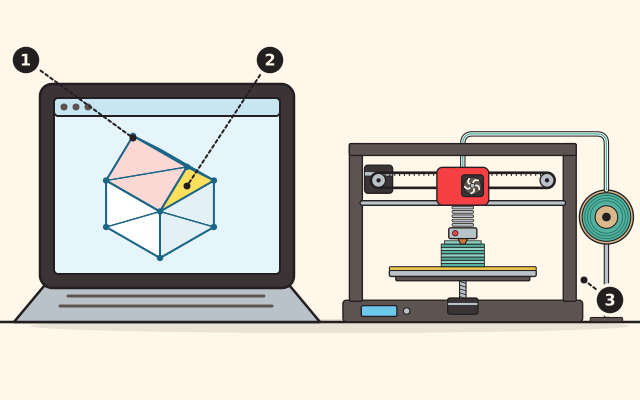
  1. The model on the screenEl modelo en la pantalla
  2. One of its trianglesUno de sus triángulos
  3. The 3D printerLa impresora 3D

Stop 1Parada 1

The digital modelEl modelo digital

Every print starts as a digital model, a shape designed on a computer with design software called CAD. Many ready-made models are shared online too, most under a license that does not let you sell what you print without the maker's permission.Toda impresión empieza como un modelo digital, una forma diseñada en la computadora con un programa de diseño llamado CAD. También hay muchos modelos listos que se comparten en internet, casi todos con una licencia que no le deja vender lo que imprima sin el permiso de quien lo hizo.

To print, the model is saved as a mesh: its whole surface made of triangles of different sizes, which every printing program can read. Check its size then, so it prints as big as you mean. The printer builds it as flat layers stacked one on another.Para imprimirlo, el modelo se guarda como una malla: toda su superficie hecha de triángulos de distintos tamaños, que cualquier programa de impresión puede leer. Revise entonces su tamaño, para que salga tan grande como usted quiere. La impresora lo construye en capas planas, una encima de otra.
Try this at homePruébelo en casaPrototype a house in cardboardHaga el prototipo de una casa en cartón

Learn more: Oregon State University College of Business, DAMLab Printing GuideMás información: Oregon State University College of Business, DAMLab Printing Guide

Next: The slicerSiguiente: El laminador

Look forBusque

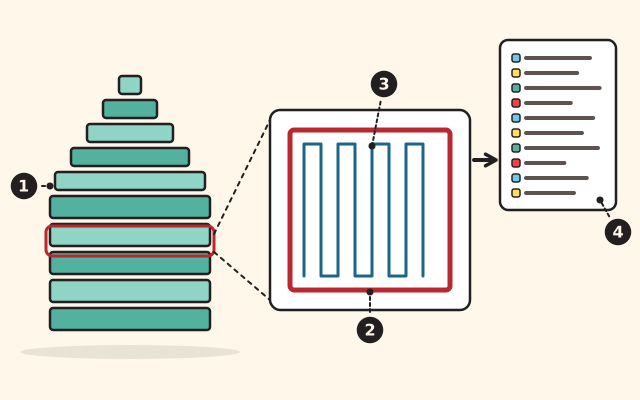
  1. The layersLas capas
  2. The outlineEl contorno
  3. The infillEl relleno
  4. The G-codeEl código G

Stop 2Parada 2

The slicerEl laminador

A program called a slicer turns the model into G-code, the printer's instructions. G-code sets the heat, the speed and the height of each layer, and tells the nozzle where to move: side to side, front to back and up.Un programa llamado laminador convierte el modelo en código G, las instrucciones de la impresora. El código G fija el calor, la rapidez y la altura de cada capa, y le dice a la boquilla adónde moverse: de lado a lado, de adelante hacia atrás y hacia arriba.

Thin layers print more detail; thick layers print faster. The inside does not have to be solid: a pattern called infill fills it, anywhere from solid down to one tenth full, which is almost hollow.Las capas delgadas imprimen más detalle; las gruesas imprimen más rápido. El interior no tiene que ser sólido: un patrón llamado relleno lo llena, desde sólido hasta una décima parte, que es casi hueco.

Try this at homePruébelo en casaHow a 3D printer slices a partCómo una impresora 3D corta una pieza en capas

Learn more: Purdue University Libraries, Glossary of Printing TerminologyMás información: Purdue University Libraries, Glossary of Printing Terminology

Next: Filament and gearsSiguiente: Filamento y engranajes

Look forBusque

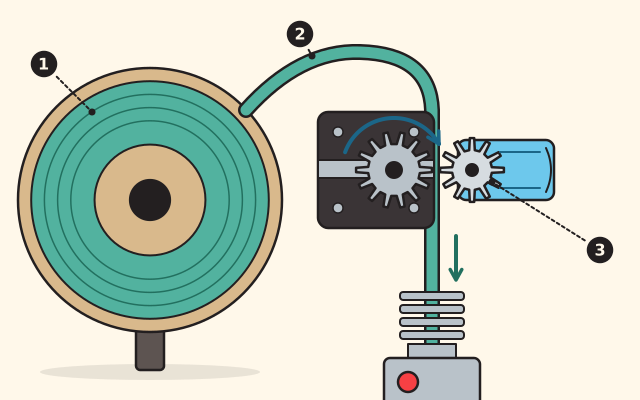
  1. The spoolEl carrete
  2. The filamentEl filamento
  3. The gearsLos engranajes

Stop 3Parada 3

Filament and gearsFilamento y engranajes

The plastic comes as a long strand, the filament, wound on a spool. It is a thermoplastic: it softens when it is heated and turns solid again when it cools. PLA, the easiest kind to use, is made from corn.El plástico viene como una hebra larga, el filamento, enrollada en un carrete. Es un termoplástico: se ablanda cuando se calienta y se vuelve sólido otra vez cuando se enfría. El PLA, el más fácil de usar, está hecho de maíz.

A set of gears grips the strand and feeds it into the hot nozzle. On some printers the strand reaches the gears through a tube.Un juego de engranajes agarra la hebra y la empuja hacia la boquilla caliente. En algunas impresoras la hebra llega a los engranajes por un tubo.

Try this at homePruébelo en casaGears: faster or strongerEngranajes: más rápido o más fuerte

Learn more: University of Maryland, Introduction to Fused Deposition ModelingMás información: University of Maryland, Introduction to Fused Deposition Modeling

Next: The hot endSiguiente: La punta caliente

Look forBusque

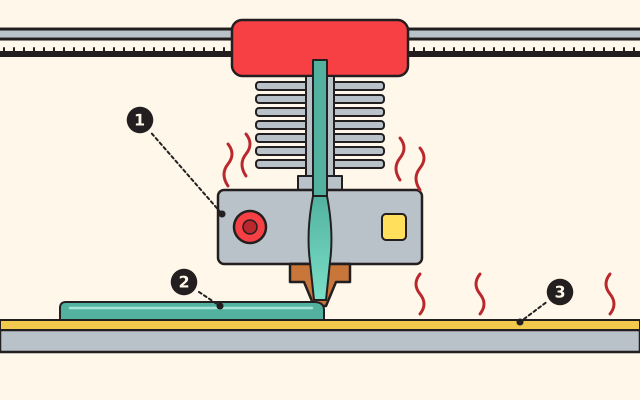
  1. The hot endLa punta caliente
  2. The melted plasticEl plástico derretido
  3. The heated bedLa cama caliente

Stop 4Parada 4

The hot endLa punta caliente

The filament feeds from the spool into the hot end, which gets hotter than two hundred degrees Celsius. The plastic melts there, and the printer moves the hot end across the bed, laying the plastic down to build the part.El filamento pasa del carrete a la punta caliente, que se calienta a más de doscientos grados Celsius. Ahí el plástico se derrite, y la impresora mueve la punta caliente sobre la cama, colocando el plástico para construir la pieza.

Each kind of filament needs its own temperature. The bed is heated too, so the part comes off only after the bed has cooled; pulled off hot, its bottom can bend.Cada tipo de filamento necesita su propia temperatura. La cama también se calienta, así que la pieza se quita solo cuando la cama se ha enfriado; si se jala en caliente, su base se puede doblar.

Try this at homePruébelo en casaIce, water and steamHielo, agua y vapor

Learn more: Oregon State University College of Business, DAMLab Printing GuideMás información: Oregon State University College of Business, DAMLab Printing Guide

Next: Motors and beltsSiguiente: Motores y bandas

Look forBusque

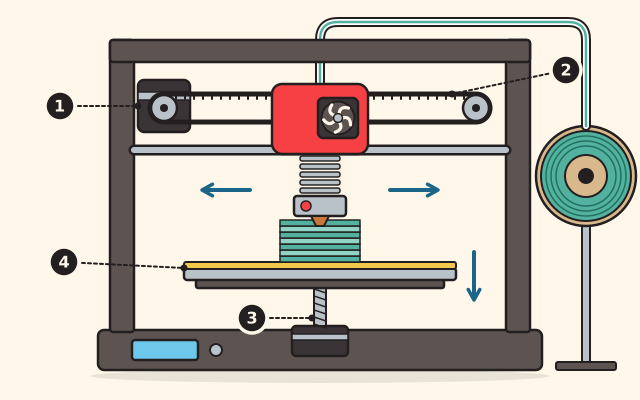
  1. The stepper motorEl motor de pasos
  2. The beltLa banda
  3. The lead screwEl tornillo guía
  4. The bedLa cama

Stop 5Parada 5

Motors and beltsMotores y bandas

Stepper motors make the printer's exact moves: side to side, front to back, and up and down. A toothed belt carries a motor's turning to the part it moves, and the G-code from the slicer tells the motors what to do.Los motores de pasos hacen los movimientos exactos de la impresora: de lado a lado, de adelante hacia atrás y de arriba abajo. Una banda con dientes lleva el giro de un motor a la parte que mueve, y el código G del laminador les dice a los motores qué hacer.

Each layer is usually between one tenth and three tenths of a millimeter high.Cada capa mide por lo general entre una décima y tres décimas de milímetro de alto.

Try this at homePruébelo en casaProgram a grown-up on a floor gridPrograme a una persona adulta en una cuadrícula en el piso

Learn more: Utah State Board of Education, CTE Strands and Standards, Print TechnologyMás información: Utah State Board of Education, CTE Strands and Standards, Print Technology

Next: Layer on layerSiguiente: Capa sobre capa

Look forBusque

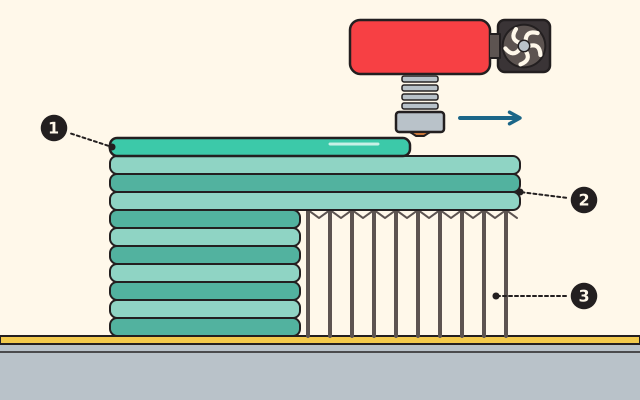
  1. The new layerLa capa nueva
  2. The overhangLa parte que sobresale
  3. The supportsLos soportes

Stop 6Parada 6

Layer on layerCapa sobre capa

The nozzle traces one slice of the part. Then the bed moves down by one layer, and the next slice goes on top. Each new line of hot plastic partly melts the layer below and fuses to it as it cools.La boquilla traza una rebanada de la pieza. Luego la cama baja una capa, y la siguiente rebanada va encima. Cada línea nueva de plástico caliente derrite un poco la capa de abajo y se une a ella al enfriarse.

Each layer must sit on the one below. Where a part leans out more than about forty five degrees from straight up, the printer builds supports under it, pulled off by hand at the end. A print is strongest along its layers and weaker across them.Cada capa debe apoyarse en la de abajo. Donde una pieza se inclina más de unos cuarenta y cinco grados de la vertical, la impresora construye soportes debajo, que se quitan a mano al final. Una impresión es más fuerte a lo largo de sus capas y más débil a través de ellas.

Try this at homePruébelo en casaHow a 3D printer slices a partCómo una impresora 3D corta una pieza en capas

Learn more: Northern Arizona University MPaCT Lab, Fused Deposition ModelingMás información: Northern Arizona University MPaCT Lab, Fused Deposition Modeling

Next: The cooling fanSiguiente: El ventilador

Look forBusque

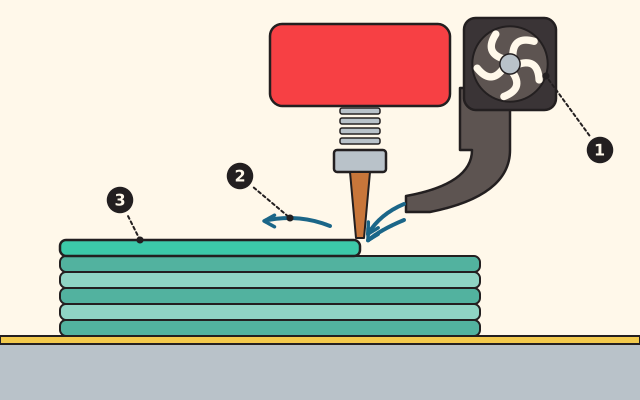
  1. The fanEl ventilador
  2. The moving airEl aire en movimiento
  3. The fresh plasticEl plástico recién puesto

Stop 7Parada 7

The cooling fanEl ventilador

Fans blow air on the nozzle and on the plastic just laid down, cooling it as the print grows. The slicer sets how hard they blow.Los ventiladores soplan aire sobre la boquilla y sobre el plástico recién colocado, y lo enfrían mientras la impresión crece. El laminador decide qué tan fuerte soplan.

Cooling takes balance. With too much, a print can bend up at its edges, peel off the bed, or its layers may not stick well to each other.Enfriar requiere equilibrio. Con demasiado, una impresión puede doblarse en las orillas, despegarse de la cama, o sus capas pueden no pegarse bien entre sí.

Try this at homePruébelo en casaHeat on the move: spoons and cupsEl calor en movimiento: cucharas y vasos

Learn more: Boise State University Albertsons Library MakerLab, CoolingMás información: Boise State University Albertsons Library MakerLab, Cooling

Next: Printing safelySiguiente: Imprimir con cuidado

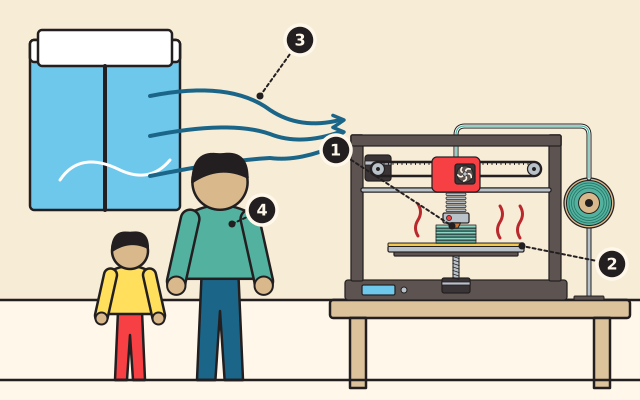
A room: a 3D printer works on a table with heat rising from its nozzle and bed, fresh air flows in through an open window, and a grown-up and a child watch from a step away.

Look forBusque

  1. The hot nozzleLa boquilla caliente
  2. The hot bedLa cama caliente
  3. The fresh airEl aire fresco
  4. A grown-up in chargeUna persona adulta a cargo

Stop 8Parada 8

Printing safelyImprimir con cuidado

A printer's hot parts can burn, and its parts move, so hands stay out while it prints. A grown-up runs the printer.Las partes calientes de una impresora pueden quemar, y sus piezas se mueven, así que las manos se quedan afuera mientras imprime. Una persona adulta maneja la impresora.

Heated plastic gives off tiny particles and gases. Print in a room with good fresh air, choose PLA rather than ABS when you can, and do not stay right beside the printer the whole time it runs.El plástico caliente suelta partículas diminutas y gases. Imprima en un cuarto con buen aire fresco, prefiera el PLA en lugar del ABS cuando pueda, y no se quede junto a la impresora todo el tiempo que funcione.

Learn more: CDC National Institute for Occupational Safety and Health, Printing with Filaments: Health and Safety Questions to AskMás información: CDC National Institute for Occupational Safety and Health, Printing with Filaments: Health and Safety Questions to Ask

Use it, share it, adapt itÚsela, compártala, adáptela

The credit to copyEl crédito para copiar

Free BYRD, CC BY. “Inside a 3D printer” from the Byrd Academy STEM Curriculum by Byrd EDU, byrdathome.org.Free BYRD, CC BY. “Dentro de una impresora 3D”, del Currículo STEM de Byrd Academy, de Byrd EDU, byrdathome.org.

This is free to use, share and adapt, even commercially, under the Creative Commons Attribution 4.0 International license (CC BY 4.0), with this credit. What Free BYRD means.Esto es libre de usar, compartir y adaptar, incluso con fines comerciales, bajo la licencia Creative Commons Atribución 4.0 Internacional (CC BY 4.0), con este crédito. Qué significa Free BYRD.

Keep goingSiga adelante

What to do nextQué hacer después

Make it harderHágalo más difícil

Design a small box and a lid that should fit on it. Print both, test the fit, then change the model a little at a time until the lid slides on snugly. Write down what you changed each time and what happened.Diseñe una cajita y una tapa que le quede. Imprima las dos, pruebe cómo ajustan y luego cambie el modelo poco a poco hasta que la tapa entre justa. Anote qué cambió cada vez y qué pasó.

For a younger onePara alguien más pequeño

Build a house from layers at the kitchen table. Cut many cardboard squares the same size for the walls, then smaller and smaller ones for the roof, and stack them in order. That is how a 3D printer builds, one layer at a time.Construya una casa de capas en la mesa de la cocina. Corte muchos cuadros de cartón del mismo tamaño para las paredes, luego otros cada vez más pequeños para el techo, y apílelos en orden. Así construye una impresora 3D, una capa a la vez.

Try this nextPruebe esto después

SIM-0009

How a 3D printer slices a partCómo una impresora 3D corta una pieza en capas

Slice a little house, a cup, a cone or a pyramid into layers, watch the printer build it from the bed up, and see where a part needs support.Corte en capas una casita, un vaso, un cono o una pirámide, vea a la impresora construirla desde la cama hacia arriba y descubra dónde una pieza necesita soporte.

  • Ways in:Formas de empezar:
  • SimulateSimular

Best for ages 6 and upIdeal desde los 6 años

ManufacturingManufacturaDesignDiseño

Free BYRD, CC BYSimulationSimulación

BH-0002

Prototype a house in cardboardHaga el prototipo de una casa en cartón

Draw a house as flat pieces, cut them from cardboard, and fold and tape them into a model you can hold.Dibuje una casa en piezas planas, recórtelas de cartón y dóblelas y péguelas hasta tener un modelo que pueda sostener.

  • Ways in:Formas de empezar:
  • ReadLeer
  • DoHacer
  • SimulateSimular

Best for ages 6 to 14Ideal de 6 a 14 años

ManufacturingManufacturaDesignDiseño

Free BYRD, CC BYLessonLección

STEMGrades 9 to 12Grados 9 a 12 From screen to real thing, what changes?De la pantalla a la cosa real, ¿qué cambia? STEM-HS-04

CAD and FabricationCAD y fabricación

Design a useful part in CAD with full dimensions, make it on a three-dimensional printer, test the fit, and revise when reality disagrees with the model.Diseñe una pieza útil en CAD con todas sus dimensiones, fabríquela en una impresora tridimensional, pruebe el ajuste y revísela cuando la realidad no coincida con el modelo.

  • Ways in:Formas de empezar:
  • ReadLeer
  • DoHacer
  • SimulateSimular

Grades 9 to 12Grados 9 a 12

ManufacturingManufacturaDesignDiseño

Free BYRD, CC BYCurriculum unitUnidad del currículo

BH-0043

Design a holder with every dimension, build it in cardboard and fit-test itDiseñe un soporte con todas sus medidas, constrúyalo en cartón y pruebe el ajuste

Find something at home that needs a holder or a bracket, draw it with a dimension on every feature, build it in cardboard, run a fit test, and make one reasoned revision.Encuentre algo en casa que necesite un soporte o una ménsula, dibújelo con una medida en cada detalle, constrúyalo en cartón, haga una prueba de ajuste y haga una sola revisión razonada.

  • Ways in:Formas de empezar:
  • ReadLeer
  • DoHacer
  • SimulateSimular

Best for ages 12 and upIdeal desde los 12 años

ManufacturingManufacturaDesignDiseño

Free BYRD, CC BYHome activityActividad en casa

Explore everythingExplorar todo