
Virtual toursRecorridos virtualesTOUR-0003

TOUR-0003

Virtual tour, 8 minutes, 8 stopsRecorrido virtual, 8 minutos, 8 paradas

Inside a computer, from the keyboard to the bitsDentro de una computadora, del teclado a los bits

Open a desktop computer and follow what you type all the way in: the keyboard and mouse, the main board, the processor, memory and storage, the power supply, the fan, the graphics chip, and down to the ones and zeros.Abra una computadora de escritorio y siga lo que usted escribe hasta el fondo: el teclado y el ratón, la placa principal, el procesador, la memoria y el almacenamiento, la fuente de poder, el ventilador, el chip de gráficos y, al final, los unos y los ceros.

AgesEdades
Every age. Best for ages 8 and up.Todas las edades. Ideal desde los 8 años.
TopicTema
Computers, robots and AIComputadoras, robots e IA
HowCómo
Tap the ring, or use Go deeper or the arrow keys.Toque el anillo, o use Más adentro o las flechas del teclado.

The MESH'D components this tour shows:Los componentes MESH'D que muestra:ElectronicsElectrónicaSoftwareSoftware

The stopsLas paradas

Look forBusque

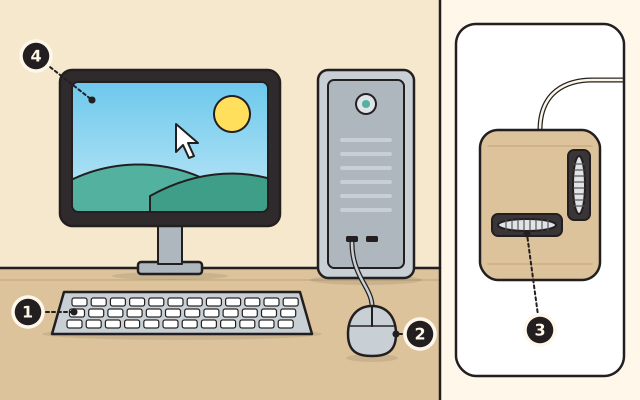
  1. The keyboardEl teclado
  2. The mouseEl ratón
  3. An early mouse and its two wheelsUn ratón antiguo y sus dos ruedas
  4. The screen, where the computer answersLa pantalla, donde la computadora responde

Stop 1Parada 1

The keyboard and the mouseEl teclado y el ratón

People talk to computers, and computers talk back. Input devices carry your side in: the keyboard for typing, and the mouse for pointing at things on the screen.Las personas les hablan a las computadoras, y las computadoras les responden. Los dispositivos de entrada llevan su parte hacia adentro: el teclado para escribir y el ratón para señalar cosas en la pantalla.

An early mouse, invented at a research institute, rolled on two sharp wheels set at right angles. Each wheel rolled in just one direction and reported the motion that way. Douglas Engelbart showed his mouse to the public in 1968, though the word mouse never appears in his patent.Uno de los primeros ratones, inventado en un instituto de investigación, rodaba sobre dos ruedas afiladas puestas en ángulo recto. Cada rueda giraba en una sola dirección e informaba el movimiento en ese sentido. Douglas Engelbart mostró su ratón al público en 1968, aunque la palabra ratón no aparece en su patente.
Try this at homePruébelo en casaTake apart a dead keyboard, name its mechanisms and rebuild itDesarme un teclado descompuesto, nombre sus mecanismos y vuélvalo a armar

Learn more: Computer History Museum, People and Machines Communicating: Input and OutputMás información: Computer History Museum, People and Machines Communicating: Input and Output

Next: The main boardSiguiente: La placa principal

Look forBusque

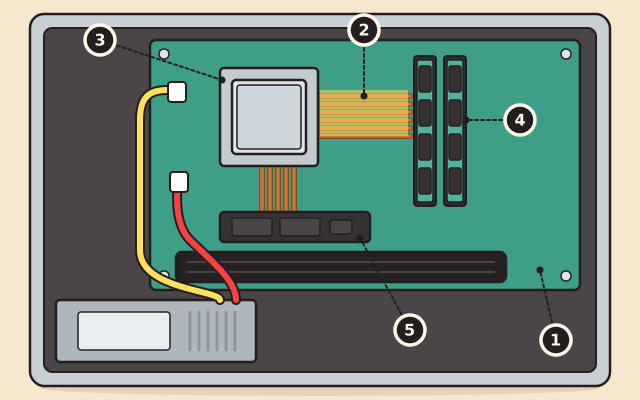
  1. The main boardLa placa principal
  2. The bus, paths side by sideEl bus, caminos lado a lado
  3. The processorEl procesador
  4. The memoryLa memoria
  5. The driveLa unidad de almacenamiento

Stop 2Parada 2

The main boardLa placa principal

Open the case and you find the main board, also called the motherboard. The processor, the memory and the storage drive all connect to it.Abra la caja y encontrará la placa principal, también llamada placa base. El procesador, la memoria y la unidad de almacenamiento se conectan a ella.

Its parts talk over a bus, a group of side by side wires that carry signals and data between them. When you open a program, it is loaded from the drive into memory, and the processor reads its instructions from memory and carries them out.Sus partes se comunican por un bus, un grupo de cables paralelos que llevan señales y datos entre ellas. Cuando usted abre un programa, este se carga desde la unidad de almacenamiento a la memoria, y el procesador lee sus instrucciones en la memoria y las cumple.

Try this at homePruébelo en casaProgram a grown-up on a floor gridPrograme a una persona adulta en una cuadrícula en el piso

Learn more: University of Maryland, Baltimore County, Machine Architecture, a computer science lectureMás información: University of Maryland, Baltimore County, Machine Architecture, a computer science lecture

Next: The processorSiguiente: El procesador

Look forBusque

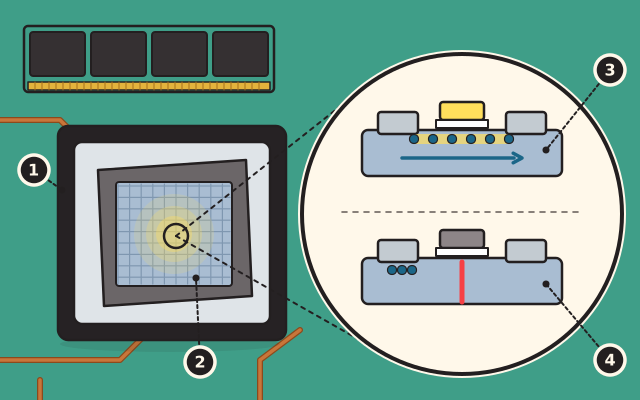
  1. The processor chipEl chip del procesador
  2. The silicon insideEl silicio de adentro
  3. A transistor switched onUn transistor encendido
  4. A transistor switched offUn transistor apagado

Stop 3Parada 3

The processorEl procesador

The processor is a chip: a small, sealed piece of silicon carrying an integrated circuit, made for electronics such as computers and cellphones. Silicon is a semiconductor, a material that can either carry electricity or block it.El procesador es un chip: una pieza pequeña y sellada de silicio que lleva un circuito integrado, hecha para aparatos electrónicos como computadoras y teléfonos celulares. El silicio es un semiconductor, un material que puede conducir la electricidad o bloquearla.

The circuit is built from transistors. A transistor is a simple switch that turns on or off when the voltage changes. Combined, transistors make complex devices, and one chip can hold billions of them.El circuito está hecho de transistores. Un transistor es un interruptor sencillo que se enciende o se apaga cuando cambia el voltaje. Juntos, los transistores forman aparatos complejos, y un solo chip puede tener miles de millones.

Try this at homePruébelo en casaWire a circuitConecte un circuito

Learn more: National Institute of Standards and Technology, Semiconductor GlossaryMás información: National Institute of Standards and Technology, Semiconductor Glossary

Next: Memory and storageSiguiente: La memoria y el almacenamiento

Look forBusque

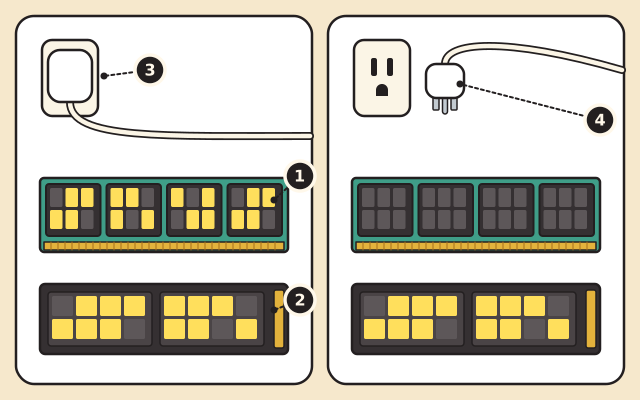
  1. The memoryLa memoria
  2. The storage driveLa unidad de almacenamiento
  3. Plugged in: power onConectada: con corriente
  4. Unplugged: memory empty, drive still fullDesconectada: memoria vacía, unidad todavía llena

Stop 4Parada 4

Memory and storageLa memoria y el almacenamiento

Memory holds the programs and documents you are using right now, and every program is brought into memory before it runs. But memory is volatile: when the power is turned off, everything in it is lost.La memoria guarda los programas y documentos que usted está usando ahora mismo, y todo programa pasa a la memoria antes de funcionar. Pero la memoria es volátil: cuando se apaga la corriente, se pierde todo lo que tiene.

Storage is for keeping. A storage drive holds your files and programs and keeps them even when the power is off, so they are there the next time you switch the computer on.El almacenamiento es para conservar. Una unidad de almacenamiento guarda sus archivos y programas y los conserva aunque no haya corriente, así que siguen ahí la próxima vez que usted encienda la computadora.

Try this at homePruébelo en casaWear your initials in binaryLleve sus iniciales en binario

Learn more: University of Maryland, Baltimore County, Machine Architecture, a computer science lectureMás información: University of Maryland, Baltimore County, Machine Architecture, a computer science lecture

Next: The power supplySiguiente: La fuente de poder

Look forBusque

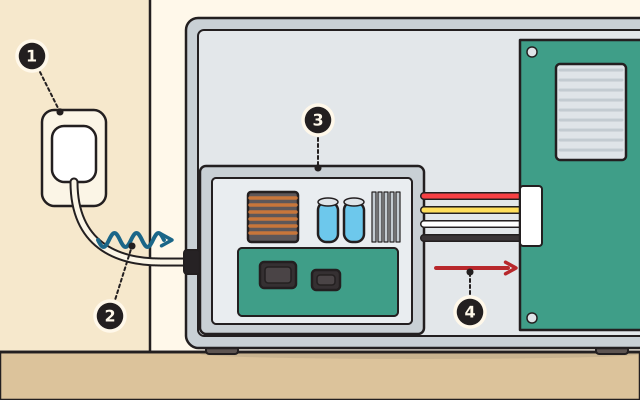
  1. The wall outletEl tomacorriente
  2. Alternating current inEntra corriente alterna
  3. The power supplyLa fuente de poder
  4. Direct current outSale corriente directa

Stop 5Parada 5

The power supplyLa fuente de poder

Electricity from the wall outlet is alternating current, but a computer's parts run on direct current. The power supply, a box inside the case, converts one into the other. It plugs into the wall with a single cable and sits apart from the main board.La electricidad del tomacorriente es corriente alterna, pero las piezas de una computadora funcionan con corriente directa. La fuente de poder, una caja dentro de la computadora, convierte una en la otra. Se conecta a la pared con un solo cable y está aparte de la placa principal.

It hands out direct current, at several voltages, to the parts that need it. Some computers use an external power supply instead, an adapter on the cord, which turns household current into direct current.Reparte corriente directa, a varios voltajes, a las piezas que la necesitan. Algunas computadoras usan en cambio una fuente externa, un adaptador en el cable, que convierte la corriente de la casa en corriente directa.

Try this at homePruébelo en casaVolts, ohms and amps: Ohm's lawVoltios, ohmios y amperios: la ley de Ohm

Learn more: US Environmental Protection Agency, ENERGY STAR Program Requirements for ComputersMás información: US Environmental Protection Agency, ENERGY STAR Program Requirements for Computers

Next: The fan and the heat sinkSiguiente: El ventilador y el disipador

Look forBusque

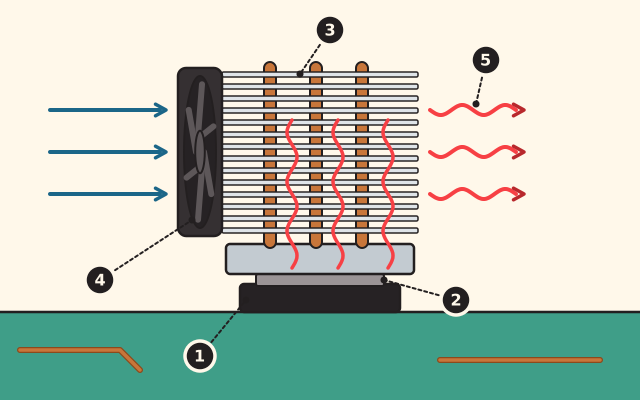
  1. The chipEl chip
  2. The pasteLa pasta
  3. The heat sink and its finsEl disipador y sus aletas
  4. The fanEl ventilador
  5. Warm air going outAire tibio que sale

Stop 6Parada 6

The fan and the heat sinkEl ventilador y el disipador

Chips make heat as they work, and electronics only run well within a narrow range of temperatures. Heat that keeps building up wears a device out.Los chips producen calor mientras trabajan, y los aparatos electrónicos solo funcionan bien dentro de un rango estrecho de temperaturas. El calor que se sigue acumulando desgasta el aparato.

So the heat is carried away. A thin paste between the chip and a heat spreader helps the heat flow out of the chip, and a fan, like the one at the back of a desktop computer, moves the warm air out.Por eso el calor se lleva lejos. Una pasta delgada entre el chip y una pieza que reparte el calor ayuda a que el calor salga del chip, y un ventilador, como el de la parte de atrás de una computadora de escritorio, saca el aire tibio.

Try this at homePruébelo en casaHeat on the move: spoons and cupsEl calor en movimiento: cucharas y vasos

Learn more: Purdue University, New research focuses on keeping today's hottest electronics coolMás información: Purdue University, New research focuses on keeping today's hottest electronics cool

Next: The graphics chipSiguiente: El chip de gráficos

Look forBusque

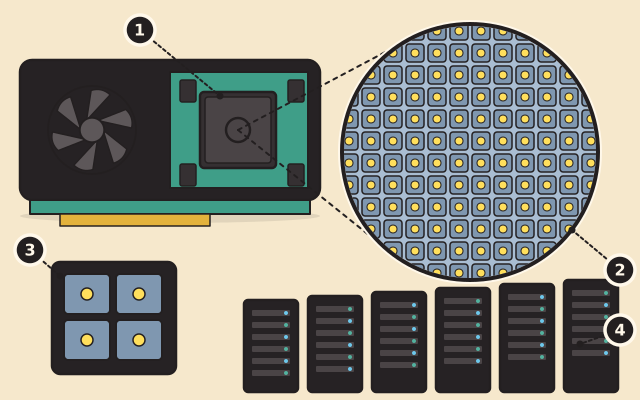
  1. The graphics processorEl procesador de gráficos
  2. Hundreds of calculations at onceCientos de cálculos a la vez
  3. The main processorEl procesador principal
  4. A science supercomputerUna supercomputadora para la ciencia

Stop 7Parada 7

The graphics chipEl chip de gráficos

A graphics processing unit is a second kind of processor. This family of chips was first created for computer games.Una unidad de procesamiento de gráficos es otra clase de procesador. Esta familia de chips se creó primero para los videojuegos.

It handles hundreds of calculations at the same time, so in a given time it gets through many more than the main processor. Scientists use them too: in 2012 a national laboratory switched on a supercomputer with more than eighteen thousand of them, then the most powerful for open science.Hace cientos de cálculos al mismo tiempo, así que en el mismo rato termina muchos más que el procesador principal. Los científicos también los usan: en 2012 un laboratorio nacional encendió una supercomputadora con más de dieciocho mil de ellos, entonces la más potente para la ciencia abierta.

Try this at homePruébelo en casaMixing light and mixing paintMezclar luz y mezclar pintura

Learn more: Oak Ridge National Laboratory, ORNL Debuts Titan SupercomputerMás información: Oak Ridge National Laboratory, ORNL Debuts Titan Supercomputer

Next: Down to the bitsSiguiente: Hasta los bits

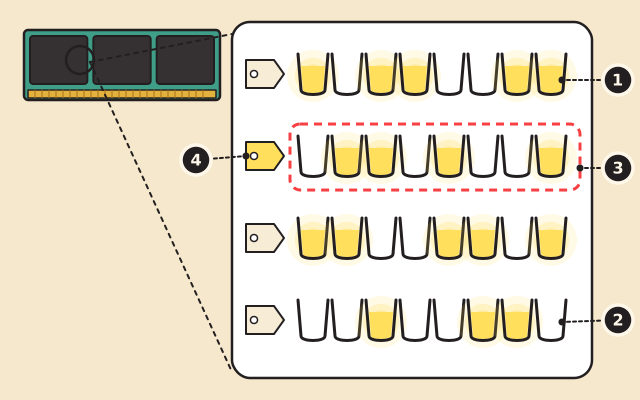
A memory stick and, up close, four rows of eight small cups. Some cups are full of glowing yellow charge and some are empty. One row is circled, and each row starts with a tag for its address.

Look forBusque

  1. A charged capacitor: one, onUn capacitor cargado: uno, encendido
  2. An empty capacitor: zero, offUn capacitor sin carga: cero, apagado
  3. A cell of eight bits, one byteUna celda de ocho bits, un byte
  4. The cell's addressLa dirección de la celda

Stop 8Parada 8

Down to the bitsHasta los bits

Deep inside, memory is made of tiny capacitors, places that can hold an electric charge. A charged one counts as a one, or on. One with no charge counts as a zero, or off. Each one or zero is a bit.En lo más profundo, la memoria está hecha de capacitores diminutos, lugares que pueden guardar una carga eléctrica. Uno cargado cuenta como un uno, o encendido. Uno sin carga cuenta como un cero, o apagado. Cada uno o cero es un bit.

Memory is divided into cells of eight bits, and eight bits make a byte. Each cell has its own number, its address. Everything in memory, every program and every document, is kept as ones and zeros like these.La memoria se divide en celdas de ocho bits, y ocho bits forman un byte. Cada celda tiene su propio número, su dirección. Todo lo que hay en la memoria, cada programa y cada documento, se guarda como unos y ceros como estos.

Try this at homePruébelo en casaBits, switches and pixelsBits, interruptores y píxeles

Learn more: University of Maryland, Baltimore County, Machine Architecture, a computer science lectureMás información: University of Maryland, Baltimore County, Machine Architecture, a computer science lecture

Use it, share it, adapt itÚsela, compártala, adáptela

The credit to copyEl crédito para copiar

Free BYRD, CC BY. “Inside a computer, from the keyboard to the bits” from the Byrd Academy STEM Curriculum by Byrd EDU, byrdathome.org.Free BYRD, CC BY. “Dentro de una computadora, del teclado a los bits”, del Currículo STEM de Byrd Academy, de Byrd EDU, byrdathome.org.

This is free to use, share and adapt, even commercially, under the Creative Commons Attribution 4.0 International license (CC BY 4.0), with this credit. What Free BYRD means.Esto es libre de usar, compartir y adaptar, incluso con fines comerciales, bajo la licencia Creative Commons Atribución 4.0 Internacional (CC BY 4.0), con este crédito. Qué significa Free BYRD.

Keep goingSiga adelante

What to do nextQué hacer después

Make it harderHágalo más difícil

Count in binary on one hand: each finger is a bit, up for one and down for zero, and each finger is worth twice the one before it. How high can one hand count? How high can a whole byte of eight bits count?Cuente en binario con una mano: cada dedo es un bit, arriba para uno y abajo para cero, y cada dedo vale el doble del anterior. ¿Hasta cuánto puede contar una mano? ¿Hasta cuánto puede contar un byte entero de ocho bits?

For a younger onePara alguien más pequeño

Point to each part and say its job: the keyboard listens, the processor follows the steps, the memory remembers for now, the drive keeps things, the fan cools. Then flip a light switch together: on is one, off is zero.Señale cada parte y diga su trabajo: el teclado escucha, el procesador sigue los pasos, la memoria recuerda por ahora, la unidad guarda las cosas, el ventilador enfría. Luego prendan y apaguen juntos un interruptor de luz: encendido es uno, apagado es cero.

Try this nextPruebe esto después

SIM-0027

Bits, switches and pixelsBits, interruptores y píxeles

Flip eight light switches to make any number up to two hundred fifty-five, then draw a picture in which every row is one of those numbers.Mueva ocho interruptores de luz para formar cualquier número hasta doscientos cincuenta y cinco, y luego haga un dibujo en el que cada fila es uno de esos números.

  • Ways in:Formas de empezar:
  • SimulateSimular

Best for ages 6 and upIdeal desde los 6 años

ElectronicsElectrónicaSoftwareSoftware

Free BYRD, CC BYSimulationSimulación

SIM-0010

Code the robotPrograme al robot

Build a program from cards and watch the robot follow it exactly. Use a repeat to run the same cards again and again, so a short program can drive a whole square.Arme un programa con tarjetas y vea al robot seguirlo al pie de la letra. Use una repetición para correr las mismas tarjetas una y otra vez, para que un programa corto trace todo un cuadrado.

  • Ways in:Formas de empezar:
  • SimulateSimular

Best for ages 5 to 14Ideal de 5 a 14 años

SoftwareSoftware

Free BYRD, CC BYSimulationSimulación

STEMGrades 6 to 8Grados 6 a 8 How do machines make decisions?¿Cómo toman decisiones las máquinas? STEM-JH-01

Meet the MicrocontrollerConozca el microcontrolador

Program a microcontroller board to blink, read a button and run your own light patterns, then build a gadget and explain its code.Programe una placa de microcontrolador para que parpadee, lea un botón y siga sus propios patrones de luz; luego arme un aparato y explique su código.

  • Ways in:Formas de empezar:
  • ReadLeer
  • DoHacer
  • SimulateSimular

Grades 6 to 8Grados 6 a 8

ManufacturingManufacturaElectronicsElectrónicaSoftwareSoftware

Free BYRD, CC BYCurriculum unitUnidad del currículo

STEMGrades 9 to 12Grados 9 a 12 How does sand become the chip that runs almost everything, and what does it take to build and run a chip factory?¿Cómo se convierte la arena en el chip que hace funcionar casi todo, y qué se necesita para construir y operar una fábrica de chips? STEM-FX-01

Silicon: How the World Makes a ChipSilicio: cómo el mundo fabrica un chip

Sand to chip: purify silicon, print with light, train like a cleanroom crew, weigh what a chip factory needs, and map its jobs. Up to eight sessions; the last two optional.De la arena al chip: purificar silicio, imprimir con luz, trabajar como en una sala limpia, evaluar lo que necesita una fábrica de chips y conocer sus empleos. Hasta ocho sesiones; las dos últimas son opcionales.

  • Ways in:Formas de empezar:
  • ReadLeer
  • DoHacer

Grades 9 to 12Grados 9 a 12

ManufacturingManufacturaElectronicsElectrónicaDesignDiseño

Free BYRD, CC BYCurriculum unitUnidad del currículo

Explore everythingExplorar todo